Buy myadpack.eu ?
We are moving the project
myadpack.eu .
Are you interested in purchasing the domain
myadpack.eu ?
domain@kv-gmbh.de · 0541-91531010
Buy myadpack.eu ?
Can the Canon EOS 400D Digital be used as a webcam?
No, the Canon EOS 400D Digital camera cannot be used as a webcam. This camera does not have the necessary hardware or software to function as a webcam. However, there are other Canon cameras that have the capability to be used as webcams with the help of specific software or firmware updates. If you are looking to use a Canon camera as a webcam, it is best to check the specific model's compatibility and available options. **
How can I set a webcam as the default webcam?
To set a webcam as the default webcam on your computer, you can usually do so through the settings or control panel. First, make sure the webcam is properly connected to your computer. Then, go to the settings or control panel and look for the "Devices" or "Camera" section. From there, you should be able to select your webcam and set it as the default device for video calls and other applications. If you're using a specific application, such as Zoom or Skype, you may also need to adjust the settings within that application to choose your webcam as the default. **


Similar search terms for Webcam
Top-Angebote
Products related to Webcam:
-
Logitech Ultra HD Pro 4K Business Webcam – BlackOverview The Logitech Ultra HD Pro 4K Business Webcam is a premium professional-grade webcam designed for high-quality video conferencing, streaming, and content creation. Featuring a powerful 13MP sensor, Ultra HD 4K video, and smooth 1080p at 60fps recording, it delivers exceptional image clarity and detail. With adjustable field of view, advanced light correction, and enterprise-ready performance, it’s ideal for modern business and hybrid work environments. Key Features Ultra HD 4K video capture for exceptional clarity 13MP image sensor for sharp, detailed visuals Full HD 1080p recording at up to 60fps 5× digital zoom for precise framing Adjustable field of view to suit different setups Autofocus for consistently sharp images Advanced auto light correction for challenging lighting conditions Dual integrated microphones for clear voice capture USB plug-and-play connectivity Benefits This webcam ensures you look professional in every meeting with crisp visuals and smooth video performance. The adjustable field of view and digital zoom allow flexible framing for individual or small group use, while advanced light correction delivers consistent image quality in low or uneven lighting. Reliable, easy to set up, and optimised for business use, it’s a dependable upgrade for any professional workspace. Specifications Specification Details Brand Logitech Model Ultra HD Pro 4K Business Webcam Colour Black Image Sensor 13MP Video Resolution Up to 4K Ultra HD Frame Rate 1080p at up to 60fps Zoom 5× digital zoom Field of View Adjustable Focus Type Autofocus Microphones Dual built-in microphones Light Correction Automatic Connectivity USB EAN 5099206068100109,00 £*Shipping: 0,00 £Secure redirect to the provider
-
LOGIK LWCAMHD23 Full HD WebcamImprove your video calls and online meetings with the LOGIK LWCAMHD23 Full HD Webcam, a simple and reliable webcam designed for clear video communication and easy setup. With Full HD resolution and a built-in microphone, it provides everything you need for video calls, streaming, and online meetings in one compact device. Featuring Full HD 1080p (1920 × 1080) video resolution, this webcam delivers sharp and detailed visuals so you appear clear during calls or recordings. Its plug-and-play USB connection allows quick setup without installing extra software, making it convenient for both home and office use. ✔️ Full HD 1080p Video Resolution – Clear and detailed video for calls, meetings, and streaming ✔️ Built-in Microphone – Integrated mic for hands-free conversations and online meetings ✔️ Plug-and-Play USB Setup – No software installation required, quick and easy to use ✔️ 12 MP Photo Capture – Take still images using the dedicated photo button ✔️ Digital Zoom & CMOS Sensor – Improved image capture for video and snapshots ✔️ Compatible with PC & Tablets – Works with Windows 8, 10, and 11 systems ✔️ Skype & Video Call Compatible – Suitable for video conferencing and online communication ✔️ 1.5 m Cable Length – Flexible wired connection for desktops and laptops The LOGIK LWCAMHD23 webcam is ideal for remote work, online classes, streaming, and staying connected with friends or colleagues. With its easy setup, Full HD video quality, and built-in microphone, it offers a practical and affordable solution for everyday video communication.28,99 £*Shipping: 0,00 £Secure redirect to the provider
-
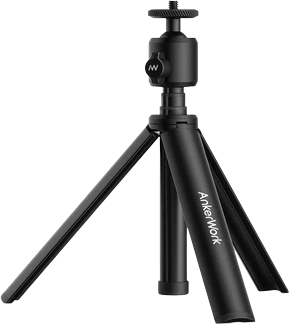
soundcore AnkerWork Mini Tripod for WebcamAdjustable to Use Anywhere:Can be used in your hand, on a table, or on the ground. Features a 360° rotatable ball head and 16.5–40 cm adjustable height so you can find the ideal angle wherever you use it. Strong and Stable:The sturdy aluminum design...39,99 $*Shipping: 0,00 $Secure redirect to the provider
-
Logitech C920 HD Pro Webcam - BlackDescription The Logitech C920 HD Pro Webcam provides Full HD video calling and streaming for professionals, content creators, gamers and anyone who wants clearer online communication. It is designed for video calls, demonstrations, recordings and live gaming streams across supported devices and services. Recording in Full HD 1080p at 30 fps, this webcam uses a five-element glass lens with a 78-degree field of view and automatic HD autofocus. Automatic light correction adjusts to lighting conditions, helping produce bright, well-contrasted images even in dim settings. The webcam connects via USB and supports Windows 7, 8, 10 or later, Mac OS 10.10 or later, Android and Chrome OS. Two microphones positioned on either side of the lens capture natural stereo audio while filtering background noise. The C920 is compatible with Xbox One and works with Skype, Google Hangouts, FaceTime, OBS and XSplit. An essential addition for video calling, streaming, recording and home or professional online content.56,49 £*Shipping: 0,00 £Secure redirect to the provider



-
Can I use my digital camera to stream, similar to a webcam?
Yes, you can use your digital camera to stream similar to a webcam by connecting it to your computer or device using a USB cable or through a capture card. However, not all digital cameras are designed for live streaming, so you may need to check if your camera has the necessary features and compatibility. Additionally, you may need to use third-party software or applications to facilitate the streaming process from your digital camera. **
-
Is the webcam mirrored?
Yes, webcams typically show a mirrored image of the user. This means that if you raise your right hand on camera, it will appear as if you are raising your left hand on the screen. This mirroring effect is common in most webcam applications and devices. **
-
What is a webcam?
A webcam is a small video camera that is typically attached to a computer or laptop. It is used to capture live video and transmit it over the internet in real-time. Webcams are commonly used for video conferencing, online meetings, live streaming, and video chatting. They are a popular tool for staying connected with others remotely. **
-
Is a webcam mandatory?
A webcam is not mandatory for all situations, but it may be required for certain activities such as video conferencing, online interviews, or virtual meetings. In these cases, having a webcam allows for face-to-face interaction and can enhance communication. However, there are also many instances where a webcam is not necessary, such as when participating in online forums, sending emails, or browsing the internet. Ultimately, the need for a webcam depends on the specific context and requirements of the activity. **

Which webcam is tiltable?
The Logitech C920 is a popular tiltable webcam. It features a 360-degree swivel and can be tilted up and down to adjust the angle. This makes it easy to position the camera to capture the desired view during video calls or recordings. The tiltable feature adds flexibility and convenience for users to customize their camera angle. **
Which webcam is better?
The Logitech C920 is generally considered to be the better webcam compared to the Logitech C615. The C920 offers higher resolution video at 1080p compared to the C615's 1080p. It also has better low-light performance and a wider field of view. Additionally, the C920 has better autofocus and image quality, making it the preferred choice for most users. **
Top-Angebote
Products related to Webcam:
-
Logitech C505e HD Business Webcam 720pLogitech C505e HD business webcam: 1280 x 720 (720p) video at 30 fps, 60-degree field of view, built-in mono microphone with noise reduction, USB-A connection with a long cable for desk or monitor mounting. Business (e) version of the C505 with Logitech Sync/RightSight support.30,49 £*Shipping: 0,00 £Secure redirect to the provider
-
Logitech Brio 4K Webcam for Business – Graphite, NewOverview The Logitech Brio 4K Webcam for Business is a premium ultra-HD webcam designed for professional video conferencing, secure authentication, and high-quality content creation. Delivering stunning 4K Ultra HD video, advanced auto-light correction, and dual noise-cancelling microphones, it ensures you look and sound your best in any working environment. With Windows Hello facial recognition support and enterprise-grade performance, it is ideal for modern hybrid and office-based professionals. Key Features Ultra HD 4K resolution for exceptional image clarity Windows Hello facial recognition for secure, password-free sign-in RightLight™ 3 with HDR for automatic light correction Dual noise-cancelling microphones for clear voice capture Adjustable field of view (65°, 78°, 90°) for flexible framing Autofocus and high frame rates for smooth, professional video USB plug-and-play compatibility Certified for Microsoft Teams, Zoom, and other conferencing platforms Sleek Graphite finish with premium build quality Benefits The Logitech Brio 4K Webcam for Business enhances professionalism in every meeting by delivering crystal-clear video and audio, even in challenging lighting conditions. Windows Hello integration improves security and convenience, while flexible field-of-view options make it suitable for both individual use and small meeting spaces. Its reliable performance and broad software compatibility make it a trusted choice for business environments. Specifications Specification Details Brand Logitech Model Brio 4K Webcam for Business Colour Graphite Video Resolution Up to 4K Ultra HD Frame Rate Up to 90 fps (lower resolutions) Field of View 65°, 78°, 90° Focus Type Autofocus Microphones Dual noise-cancelling microphones Light Correction RightLight™ 3 with HDR Security Windows Hello facial recognition Connectivity USB Compatibility Windows, macOS Certification Microsoft Teams, Zoom, Google Meet EAN 509920612996285,00 £*Shipping: 0,00 £Secure redirect to the provider
-
Logitech Ultra HD Pro 4K Business Webcam – BlackOverview The Logitech Ultra HD Pro 4K Business Webcam is a premium professional-grade webcam designed for high-quality video conferencing, streaming, and content creation. Featuring a powerful 13MP sensor, Ultra HD 4K video, and smooth 1080p at 60fps recording, it delivers exceptional image clarity and detail. With adjustable field of view, advanced light correction, and enterprise-ready performance, it’s ideal for modern business and hybrid work environments. Key Features Ultra HD 4K video capture for exceptional clarity 13MP image sensor for sharp, detailed visuals Full HD 1080p recording at up to 60fps 5× digital zoom for precise framing Adjustable field of view to suit different setups Autofocus for consistently sharp images Advanced auto light correction for challenging lighting conditions Dual integrated microphones for clear voice capture USB plug-and-play connectivity Benefits This webcam ensures you look professional in every meeting with crisp visuals and smooth video performance. The adjustable field of view and digital zoom allow flexible framing for individual or small group use, while advanced light correction delivers consistent image quality in low or uneven lighting. Reliable, easy to set up, and optimised for business use, it’s a dependable upgrade for any professional workspace. Specifications Specification Details Brand Logitech Model Ultra HD Pro 4K Business Webcam Colour Black Image Sensor 13MP Video Resolution Up to 4K Ultra HD Frame Rate 1080p at up to 60fps Zoom 5× digital zoom Field of View Adjustable Focus Type Autofocus Microphones Dual built-in microphones Light Correction Automatic Connectivity USB EAN 5099206068100109,00 £*Shipping: 0,00 £Secure redirect to the provider
-
LOGIK LWCAMHD23 Full HD WebcamImprove your video calls and online meetings with the LOGIK LWCAMHD23 Full HD Webcam, a simple and reliable webcam designed for clear video communication and easy setup. With Full HD resolution and a built-in microphone, it provides everything you need for video calls, streaming, and online meetings in one compact device. Featuring Full HD 1080p (1920 × 1080) video resolution, this webcam delivers sharp and detailed visuals so you appear clear during calls or recordings. Its plug-and-play USB connection allows quick setup without installing extra software, making it convenient for both home and office use. ✔️ Full HD 1080p Video Resolution – Clear and detailed video for calls, meetings, and streaming ✔️ Built-in Microphone – Integrated mic for hands-free conversations and online meetings ✔️ Plug-and-Play USB Setup – No software installation required, quick and easy to use ✔️ 12 MP Photo Capture – Take still images using the dedicated photo button ✔️ Digital Zoom & CMOS Sensor – Improved image capture for video and snapshots ✔️ Compatible with PC & Tablets – Works with Windows 8, 10, and 11 systems ✔️ Skype & Video Call Compatible – Suitable for video conferencing and online communication ✔️ 1.5 m Cable Length – Flexible wired connection for desktops and laptops The LOGIK LWCAMHD23 webcam is ideal for remote work, online classes, streaming, and staying connected with friends or colleagues. With its easy setup, Full HD video quality, and built-in microphone, it offers a practical and affordable solution for everyday video communication.28,99 £*Shipping: 0,00 £Secure redirect to the provider
-
Can the Canon EOS 400D Digital be used as a webcam?
No, the Canon EOS 400D Digital camera cannot be used as a webcam. This camera does not have the necessary hardware or software to function as a webcam. However, there are other Canon cameras that have the capability to be used as webcams with the help of specific software or firmware updates. If you are looking to use a Canon camera as a webcam, it is best to check the specific model's compatibility and available options. **
-
How can I set a webcam as the default webcam?
To set a webcam as the default webcam on your computer, you can usually do so through the settings or control panel. First, make sure the webcam is properly connected to your computer. Then, go to the settings or control panel and look for the "Devices" or "Camera" section. From there, you should be able to select your webcam and set it as the default device for video calls and other applications. If you're using a specific application, such as Zoom or Skype, you may also need to adjust the settings within that application to choose your webcam as the default. **
-
Can I use my digital camera to stream, similar to a webcam?
Yes, you can use your digital camera to stream similar to a webcam by connecting it to your computer or device using a USB cable or through a capture card. However, not all digital cameras are designed for live streaming, so you may need to check if your camera has the necessary features and compatibility. Additionally, you may need to use third-party software or applications to facilitate the streaming process from your digital camera. **
-
Is the webcam mirrored?
Yes, webcams typically show a mirrored image of the user. This means that if you raise your right hand on camera, it will appear as if you are raising your left hand on the screen. This mirroring effect is common in most webcam applications and devices. **
Similar search terms for Webcam
-
soundcore AnkerWork Mini Tripod for WebcamAdjustable to Use Anywhere:Can be used in your hand, on a table, or on the ground. Features a 360° rotatable ball head and 16.5–40 cm adjustable height so you can find the ideal angle wherever you use it. Strong and Stable:The sturdy aluminum design...39,99 $*Shipping: 0,00 $Secure redirect to the provider
-
Logitech C920 HD Pro Webcam - BlackDescription The Logitech C920 HD Pro Webcam provides Full HD video calling and streaming for professionals, content creators, gamers and anyone who wants clearer online communication. It is designed for video calls, demonstrations, recordings and live gaming streams across supported devices and services. Recording in Full HD 1080p at 30 fps, this webcam uses a five-element glass lens with a 78-degree field of view and automatic HD autofocus. Automatic light correction adjusts to lighting conditions, helping produce bright, well-contrasted images even in dim settings. The webcam connects via USB and supports Windows 7, 8, 10 or later, Mac OS 10.10 or later, Android and Chrome OS. Two microphones positioned on either side of the lens capture natural stereo audio while filtering background noise. The C920 is compatible with Xbox One and works with Skype, Google Hangouts, FaceTime, OBS and XSplit. An essential addition for video calling, streaming, recording and home or professional online content.56,49 £*Shipping: 0,00 £Secure redirect to the provider
-
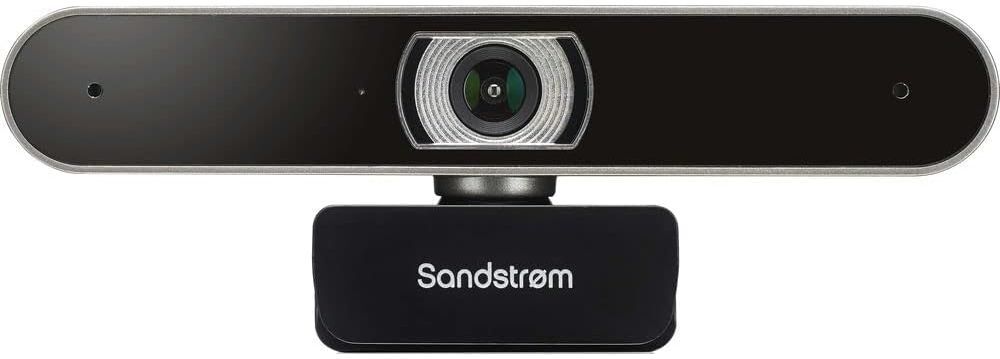
Sandstrom SWCAMHD19 Full HD Pro WebcamOverview: The Sandstrom SWCAMHD19 Full HD Pro Webcam is an affordable and reliable choice for video conferencing, streaming, and content creation. Key Specifications: Full HD 1920 x 1080p resolution 2MP CMOS sensor Up to 30fps frame rate 83° wide-angle lens Auto-focus feature Built-in dual microphones Plug-and-play compatibility with Windows XP and above, macOS 10.6+, USB 2.0 Clip-on design with included tripod Dimensions: 45.8 x 131.3 x 29.1 mm Weight: 145g Summary: The Sandstrom SWCAMHD19 offers solid performance for basic video needs, making it a good option for those seeking an affordable webcam with straightforward functionality.49,98 £*Shipping: 0,00 £Secure redirect to the provider
-
HP PC Webcam 320 – 1080p FHD Webcam with Built-in Microphone, Auto Light Correction & 360° Swivel Clip – BlackOverview Stay connected in crystal-clear detail with the HP PC Webcam 320, a sleek and reliable 1080p Full HD webcam designed for video calls, online learning, streaming, and remote meetings. Featuring automatic light correction, a built-in digital microphone, and a wide 66° field of view, this plug-and-play webcam ensures you look and sound great in any lighting. Compatible with Chrome, Windows, macOS, and more, it’s the perfect upgrade for clear, professional communication. Key Features Full HD 1080p Resolution – Delivers sharp, high-definition video at 30fps Auto Light Correction – Adjusts automatically to lighting conditions for better clarity in dim or bright rooms Built-in Microphone – Integrated digital mic captures your voice clearly without the need for extra equipment 66° Wide Angle Field of View – Perfect framing for solo calls and small groups 360° Swivel Clip – Easily adjust the camera angle and position for perfect placement Plug-and-Play via USB – No drivers required; connect and start using instantly Universal Compatibility – Works with Chrome OS, Windows 10/11, macOS, and popular conferencing platforms like Zoom, Teams, Google Meet, and Skype Compact & Modern Design – Discreet black finish blends seamlessly with any desktop or laptop setup Benefits Whether you’re working from home, attending virtual classes, or streaming content, the HP PC Webcam 320 provides professional-grade video and audio in a compact, user-friendly design. The auto-adjusting light correction and wide-angle lens ensure you're always in frame and well-lit, while the 360° swivel clip offers flexibility for any screen setup. It’s a simple yet powerful tool for clearer, more confident communication. Specifications Specification Details Model HP PC Webcam 320 Video Resolution 1920 x 1080 (Full HD 1080p at 30fps) Field of View 66 degrees (wide angle) Microphone Built-in Digital Microphone Light Adjustment Automatic Light Correction Mounting 360° Swivel Clip (fits most monitors/laptops) Connectivity USB-A (Plug-and-Play, no software required) Compatibility Chrome OS, Windows 10/11, macOS Dimensions (approx.) Compact, portable design Colour Black39,99 £*Shipping: 0,00 £Secure redirect to the provider
-
What is a webcam?
A webcam is a small video camera that is typically attached to a computer or laptop. It is used to capture live video and transmit it over the internet in real-time. Webcams are commonly used for video conferencing, online meetings, live streaming, and video chatting. They are a popular tool for staying connected with others remotely. **
-
Is a webcam mandatory?
A webcam is not mandatory for all situations, but it may be required for certain activities such as video conferencing, online interviews, or virtual meetings. In these cases, having a webcam allows for face-to-face interaction and can enhance communication. However, there are also many instances where a webcam is not necessary, such as when participating in online forums, sending emails, or browsing the internet. Ultimately, the need for a webcam depends on the specific context and requirements of the activity. **
-
Which webcam is tiltable?
The Logitech C920 is a popular tiltable webcam. It features a 360-degree swivel and can be tilted up and down to adjust the angle. This makes it easy to position the camera to capture the desired view during video calls or recordings. The tiltable feature adds flexibility and convenience for users to customize their camera angle. **
-
Which webcam is better?
The Logitech C920 is generally considered to be the better webcam compared to the Logitech C615. The C920 offers higher resolution video at 1080p compared to the C615's 1080p. It also has better low-light performance and a wider field of view. Additionally, the C920 has better autofocus and image quality, making it the preferred choice for most users. **
* All prices are inclusive of VAT and, if applicable, plus shipping costs. The offer information is based on the details provided by the respective shop and is updated through automated processes. Real-time updates do not occur, so deviations can occur in individual cases. ** Note: Parts of this content were created by AI.